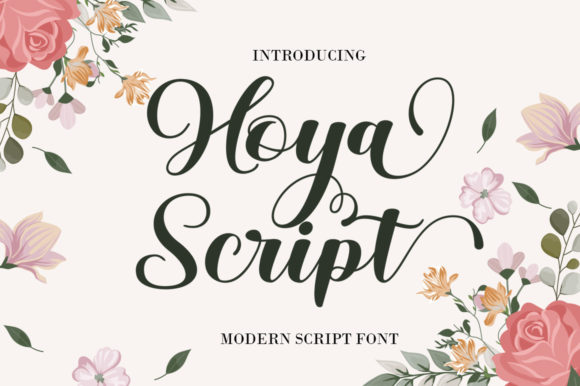
Hoya Script: A Premium Handwritten Font for Web Design
I was staring at a blank hero section on my latest client project, a boutique online store for handmade ceramics, when I realized the standard sans-serif headers just weren't capturing the warmth of the brand. The products were artisanal and personal, yet the typography felt cold and corporate. I needed a typeface that could bridge the gap between digital professionalism and human touch. That is when I decided to test Hoya Script, an enchanting handwritten font designed to bring personality to digital layouts. As I typed out the headline "Crafted with Care," the difference was immediate; the fluid strokes of this Script Handwritten style instantly elevated the mood of the page.
Hoya Script for Elegant Website Headers and Hero Sections
When selecting Fonts for a website's most critical area—the hero section—readability and emotional impact must work in harmony. Hoya Script proved to be an excellent choice for this specific use case because it commands attention without feeling chaotic. In my testing, I placed the font over a soft, textured background image of clay and glazes. The contrast was perfect; the dark ink-like weight of the letters stood out clearly against the lighter backdrop, ensuring that users scanning the page would immediately grasp the brand's message. Unlike many decorative display fonts that become illegible on mobile screens, this versatile script font maintained its character even at smaller sizes, making it ideal for responsive web design where space is limited.
The visual hierarchy created by using this typeface as a primary header was striking. It drew the eye down the page naturally, guiding the user toward the call-to-action button below. This is a crucial element in UI design; if the headline doesn't stop the scroll, the rest of the content rarely gets read. By integrating Hoya Script into the main title, the entire landing page felt more curated and intentional, transforming a simple product showcase into an immersive brand experience.
Using Hoya Script for Boutique Branding and Digital Logos
Beyond just headlines, I explored how Hoya Script functions as a core element of brand identity, specifically for logo design and digital branding assets. For a creative portfolio or a coaching website, the logo often needs to feel like a signature—a mark of authenticity. This Script Handwritten typeface offers exactly that level of personalization. When I mocked up a logo for a fictional life coach, the fluidity of the letters conveyed trust and approachability, traits that are essential for service-based businesses trying to connect with their audience online.
The versatility of these Fonts extends to social media graphics and promotional banners as well. Because the letterforms have such a distinct rhythm, they work beautifully in square formats for Instagram posts or as overlay text on video thumbnails for YouTube. The key is consistency; using the same typeface across your website, email newsletters, and social channels creates a cohesive visual language that strengthens brand recognition. Hoya Script provides a unique aesthetic that sets a business apart from competitors relying on generic stock typography.
Hoya Script Readability on Mobile Devices and Responsive Layouts
A major concern when implementing any decorative typeface is how it performs on mobile devices, where screen real estate is at a premium. During my layout testing, I zoomed in and out to simulate various phone screens, checking the legibility of Hoya Script in different contexts. The results were promising; the open counters and clear stroke weights ensure that the text remains decipherable even on small displays. However, it is important to remember that while this Script Handwritten font is robust, it should still be used strategically.
For body copy or long paragraphs, a clean sans-serif or serif font is always the better choice to maintain reading speed and reduce eye strain. Hoya Script shines when reserved for short phrases, titles, and emphasis. In a responsive layout, I found that setting a slightly larger line height and increasing the font size for mobile viewports helped the characters breathe, preventing them from clumping together. This attention to detail in typography settings ensures that the elegant nature of the font translates perfectly from desktop to smartphone, maintaining the high-quality feel of the digital product.
Hoya Script Pairing Strategies for Modern Web Typography
One of the most satisfying parts of working with Hoya Script is finding the perfect companion typeface to balance its ornate style. In web design, pairing a decorative display font with a neutral, highly readable font is a classic strategy for creating a polished look. For the ceramic shop project, I paired Hoya Script with a minimalist geometric sans-serif for the navigation menu and product descriptions. The stark contrast between the organic curves of the script and the rigid lines of the sans-serif created a dynamic tension that kept the design visually interesting.
If you are aiming for a more editorial or sophisticated vibe, consider pairing these Fonts with a modern serif typeface. This combination works exceptionally well for blog redesigns, course sales pages, or luxury brand websites where the goal is to evoke a sense of tradition and quality. The key to successful font pairing is ensuring that the secondary font does not compete with the primary one. Since Hoya Script has such a strong personality, let it lead the visual narrative while the supporting typeface handles the heavy lifting of information delivery.
Hoya Script PUA Encoding and Commercial Licensing for Designers
As a professional designer, technical specifications and licensing are just as important as aesthetics. One notable feature of Hoya Script is that it is PUA encoded, which means you can access a wide range of alternate characters and ligatures directly through the font map. This encoding allows for greater customization, enabling designers to swap specific glyphs to create unique variations of words or initials without needing multiple font files. This flexibility is a game-changer for creating custom headlines or distinctive logo marks within a single typeface family.
Before deploying this Script Handwritten font on any live website, client project, or commercial campaign, it is vital to review the included styles and licensing terms. Ensure that the license covers webfont usage, particularly if you are embedding the font via CSS or using it in digital templates for resale. Understanding the scope of the commercial font license protects both you and your clients from legal issues down the road. With the right permissions and technical setup, Hoya Script becomes a powerful asset in your digital toolkit, ready to enhance everything from greeting cards to complex website headers.
Hoya Script for Landing Pages and Call-to-Action Areas
The final piece of my design puzzle involved using Hoya Script to highlight key conversion points on the landing page. While buttons typically require bold, blocky text for maximum click-through rates, the surrounding context can benefit greatly from a softer touch. I used the font to write short, emotive subheadings near the "Shop Now" buttons, such as "Handmade Just for You." These small touches of Script Handwritten typography softened the aggressive nature of a sales pitch, making the user feel welcomed rather than pressured.
This strategic placement of Fonts helps guide the user's journey through the site, adding emotional cues at decision-making moments. Whether you are designing a course sales page, a product launch, or a campaign landing page, the ability to inject personality into critical areas can significantly boost engagement. Hoya Script offers the perfect balance of elegance and clarity to make these elements stand out, ensuring that your digital presence feels both professional and deeply human.